
IT Workflows: How to Improve and Automate Them | GoCo
Discover how to improve IT workflows, streamline business processes, and automate repetitive tasks. ⚙️ Learn how to get started with GoCo.
Before investing in another software tool, take a closer look at how work already gets done. Inefficient IT workflows can slow down operations, create unnecessary manual work, and increase the risk of errors. The best place to start is not necessarily the most complicated process—it is the one where a practical improvement can make a measurable difference.
For growing businesses, improving workflows means identifying where time is lost, understanding why bottlenecks happen, and choosing technology that solves the actual problem.
What Are IT Workflows?
IT workflows are the sequences of tasks, decisions, and technology systems used to complete recurring business or IT activities. They can include onboarding employees, managing access permissions, processing service requests, maintaining software, and backing up business data.
A well-designed workflow makes responsibilities clear, reduces unnecessary steps, and helps work move consistently from one stage to the next.
5 IT Workflows Your Business Should Consider Automating
1. Employee onboarding and offboarding
Creating accounts, assigning permissions, configuring devices, and removing access when someone leaves can involve several people and systems. Standardizing these steps and automating appropriate tasks helps reduce delays and the risk of forgotten permissions.
2. Repetitive IT support requests
Password resets, software access requests, and routine troubleshooting can consume time that your team could spend on more complex issues. A structured service desk, self-service options, and automated ticket routing can make these requests easier to manage.
3. Software updates and routine maintenance
Where tools support it, automated patch management and maintenance schedules can help teams apply updates consistently. Exceptions and failed updates still need monitoring, especially for systems that support critical business operations.
4. Data backups and alerts
Automated backups and system alerts can reduce reliance on manual checks. However, automation alone does not guarantee recoverability. Schedule restoration tests to verify that important data can be recovered when needed.
5. Reporting and repetitive administrative tasks
If employees repeatedly collect information from different systems to prepare reports, approve requests, or update records, workflow automation may reduce duplicate work. Start with stable, rules-based processes and ensure the resulting data remains accurate.
How to Decide What to Automate First
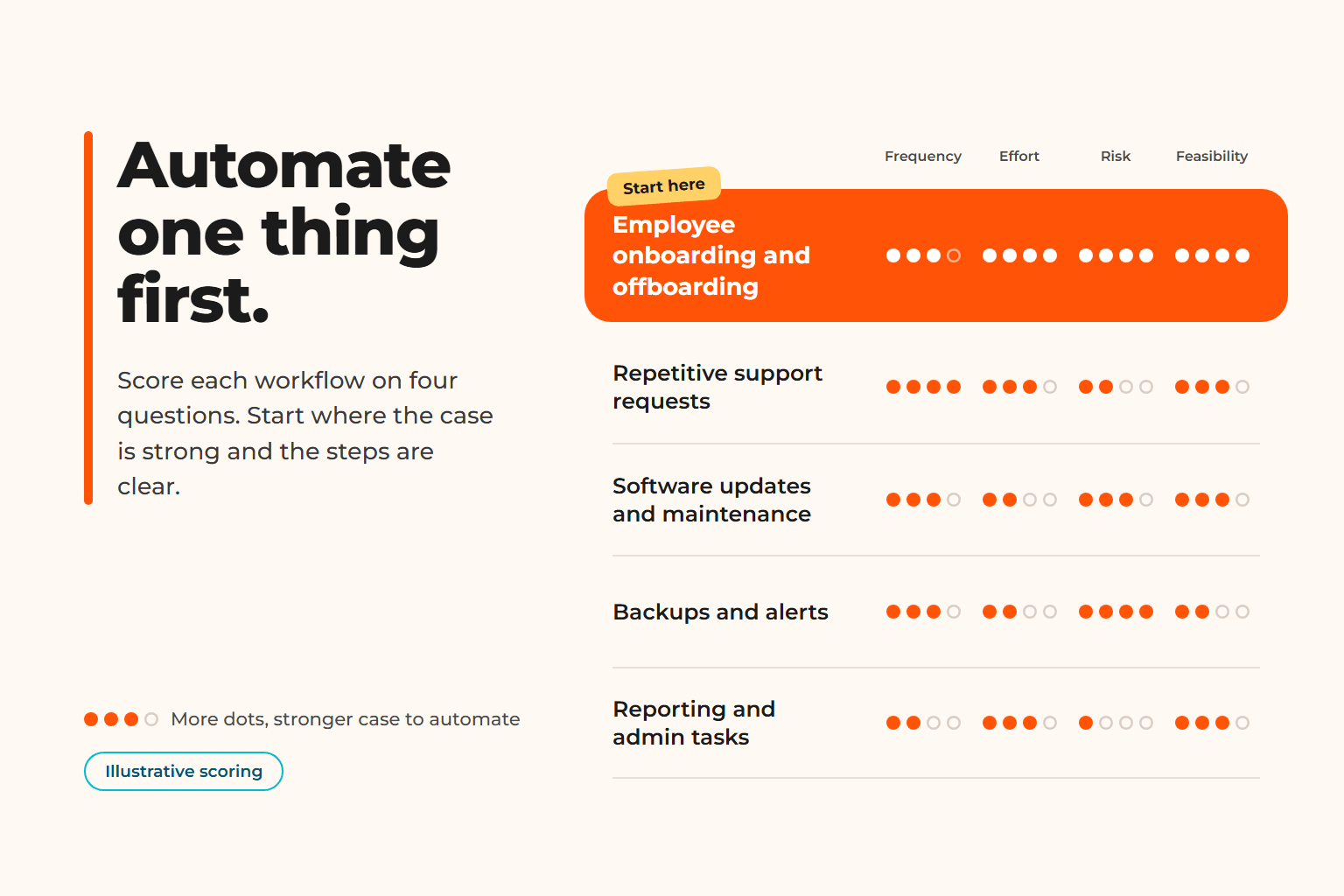
Not every repetitive task is a good automation candidate. Before selecting a tool, evaluate each process against four criteria:
- Frequency: How often does the task occur?
- Time and effort: How much staff time does it consume?
- Error and risk: What happens if a step is missed or completed incorrectly?
- Feasibility: Can the process be standardized, and do your existing systems support automation?
Choose a process that occurs frequently, has clear steps, and offers a meaningful benefit without requiring a complex implementation. Document the current workflow, establish a baseline, and measure the results after making changes.
Common Automation Mistakes to Avoid
Automating a poorly designed process can make inefficiencies happen faster. Before implementation, remove unnecessary steps and clarify who owns each decision.
Avoid introducing tools without checking integration requirements, access controls, data privacy, and ongoing maintenance. Keep human review where judgment, exceptions, or sensitive decisions require it. For AI-enabled workflows, define what information the tool can access and who verifies its output.
When Should You Bring in an IT Specialist?
If a workflow spans multiple systems, depends on manual workarounds, or creates recurring operational problems, an IT specialist can help assess the process before recommending a solution.
GoCo's Short-Term IT Projects approach can support businesses that need help evaluating an existing workflow, identifying opportunities for improvement, and implementing practical technology or automation solutions—without necessarily engaging a full-time IT team.
The goal is not to automate everything. It is to make important work simpler, more reliable, and easier to manage.
Ready to Improve Your IT Workflows?
Start by identifying one recurring task that slows your team down. Understand the problem, define the desired outcome, and evaluate whether process changes, existing tools, or automation offer the best solution.
Discuss your project with a GoCo specialist to explore practical ways to improve your business workflows.
If you found this article helpful, be sure to visit our latest piece on our Blog for more insights.
Technology decisions shouldn't be based on trends; they should support better business outcomes.
Explore our latest LinkedIn articles, where we share practical insights on Managed IT Services, cybersecurity, governance, operational excellence, and the strategies helping businesses reduce risk and scale with confidence.
Because better decisions start with better understanding.
Good Company IT
GoCo
You are in Good Company