
Cybersecurity: How to Protect Your Small Business | GoCo
Cybersecurity for small businesses starts with the basics. 🔐 Learn essential security practices and strengthen your defenses with GoCo today.
A single compromised email account can expose sensitive information, interrupt operations, or lead to fraudulent payments. Cybersecurity is not just a concern for large corporations. Small businesses also need practical safeguards to protect their systems, employees, customers, and day-to-day operations. The good news is that you can make meaningful progress by getting a few essential practices right.
What Is Cybersecurity, and Why Does It Matter?
Cybersecurity is the combination of technologies, policies, and practices used to protect systems, networks, accounts, and data from unauthorized access, damage, and disruption.
For small and mid-sized businesses, an incident can affect more than technology. It may delay customer service, expose confidential records, interrupt billing, or prevent employees from accessing essential systems. The objective is to reduce these risks and prepare the business to respond when something goes wrong.
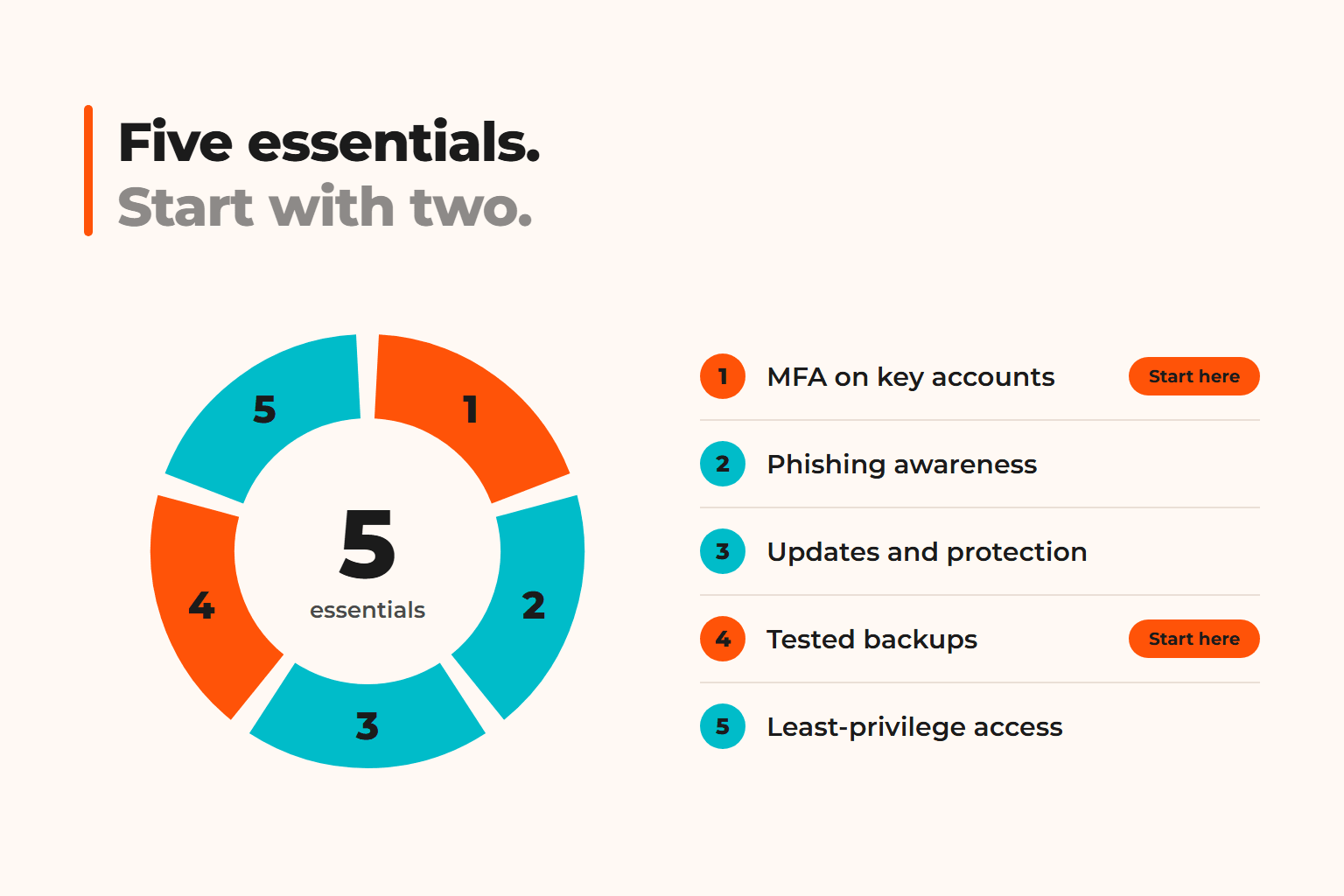
5 Cybersecurity Essentials Every Business Should Have
1. Protect Accounts With Multifactor Authentication
Passwords alone are not enough to protect important accounts. Multifactor authentication (MFA) adds an additional verification step, making it harder for someone to access an account with a stolen password.
Enable MFA for email, remote access, cloud applications, financial systems, and administrator accounts. Use individual accounts rather than shared credentials, and remove access promptly when employees leave or change roles.
2. Train Employees to Recognize Phishing
Phishing messages may imitate executives, suppliers, banks, or familiar service providers. They often create a sense of urgency to encourage someone to click a link, open an attachment, reveal credentials, or approve a payment.
Teach employees to verify unexpected requests through a separate, trusted channel. Establish a simple process for reporting suspicious messages, and make sure people know that reporting a mistake quickly is better than hiding it.
3. Keep Systems Updated and Protected
Outdated operating systems, applications, routers, and other devices can contain vulnerabilities that attackers may exploit.
Maintain an inventory of business devices and software. Apply security updates promptly according to risk, use supported operating systems, and deploy appropriate endpoint protection. Confirm that security tools are active and that someone is responsible for investigating alerts.
4. Back Up Critical Business Data
Backups help your business recover from accidental deletion, hardware failure, ransomware, and other disruptions. However, having a backup does not guarantee that you can restore your operations.
Identify the data and systems that matter most, establish backup schedules, protect backup access, and test restoration procedures. Define how much downtime your business can tolerate and how much recent data it can afford to lose.
5. Control Access to Information
Not every employee needs access to every system or file. Apply the principle of least privilege: give users only the permissions required for their responsibilities.
Review administrator accounts, third-party access, and permissions for sensitive information. When a project or vendor relationship ends, ensure unnecessary access is removed. These steps reduce opportunities for unauthorized activity and limit the potential impact of compromised accounts.
What Should You Do if You Suspect a Cybersecurity Incident?
A clear response process helps employees act quickly rather than guess.
Report the incident immediately to the designated IT or security contact. Follow established procedures to isolate affected devices when appropriate, preserve relevant evidence, and secure compromised accounts. Avoid deleting files or attempting unapproved fixes that could interfere with investigation and recovery.
Your response plan should identify decision-makers, technical contacts, communication procedures, and recovery priorities. If you use an external IT provider, confirm in advance who is responsible for each action.
How to Know Whether Your Business Is Protected
Start by reviewing your current controls against the five essentials above. Identify missing safeguards, unclear responsibilities, and processes that have never been tested.
Prioritize gaps according to business impact. A company without MFA on email or reliable backups should address those foundational weaknesses before investing in more advanced tools.
Cybersecurity is an ongoing process. Review access, update systems, test recovery, and revisit employee training as your business and technology environment change.
Strengthen Your Cybersecurity With a Practical Plan
You do not need a complicated security environment to start improving protection. You need clear priorities, reliable controls, and people who understand their responsibilities.
GoCo helps businesses assess their IT environments, strengthen security practices, and make informed technology decisions. Talk to a GoCo specialist to identify gaps in your current approach and determine which improvements should come first.
The right foundation helps your business protect what matters and operate with greater confidence.
How Strong Is Your Cybersecurity Knowledge?
Knowing the basics is a great start, but how prepared are you to recognize common cybersecurity risks in your daily work? Put your knowledge to the test with GoCo’s interactive cybersecurity quiz and game. Explore common security scenarios, challenge your understanding, and discover where you may need to strengthen your approach. Take the quiz and test your cybersecurity knowledge today!
If you found this article helpful, be sure to visit our latest piece on our Blog for more insights.
Technology decisions shouldn't be based on trends; they should support better business outcomes.
Explore our latest LinkedIn articles, where we share practical insights on Managed IT Services, cybersecurity, governance, operational excellence, and strategies that help businesses reduce risk and scale with confidence.
Because better decisions start with better understanding.
Good Company IT
GoCo
You are in Good Company